JPG vs PNG vs WEBP: Which is Best for PDF Conversion?
Quick Answer
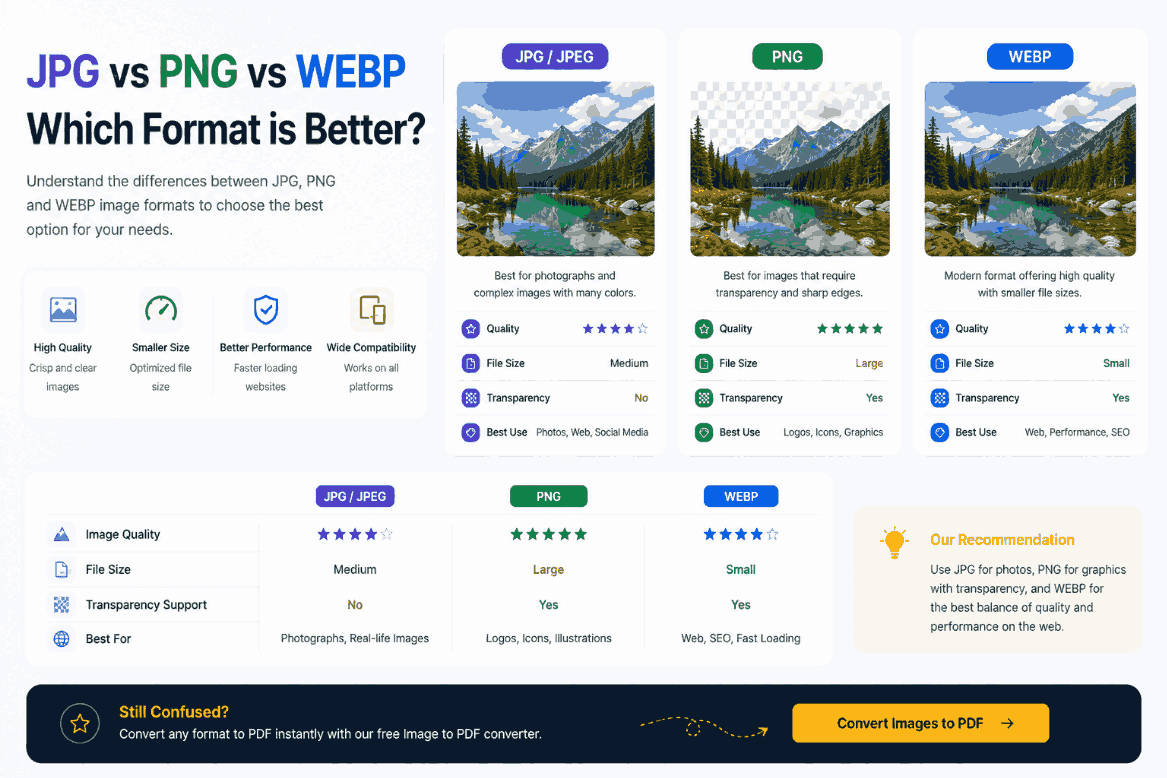
For natural photographs and camera shots, use JPG. For screenshots, digital illustrations, and documents containing sharp text, use PNG. For optimal file size and quality retention—provided your compiler supports it—consider WEBP.
Summary
Not all digital images are created equal. The mathematical algorithms used to encode a photograph differ entirely from those used to encode a company logo. When compiling these assets into a PDF, choosing the wrong initial format can result in bloated file sizes or illegible text. This technical guide breaks down the core architectures of JPG, PNG, and WEBP to help you optimize your digital documents.
Introduction
When you initiate an Image to PDF conversion, the compiler takes the raw data of your image and wraps it in a PDF envelope. Therefore, the visual quality and the final megabyte size of your document are almost entirely dictated by the file format of the source image.
Understanding how the three dominant web formats compress data will allow you to engineer PDFs that look pristine on 4K monitors while remaining small enough to bypass email attachment limits.
JPG: The Photographic Standard
Developed by the Joint Photographic Experts Group, the JPG (or JPEG) format revolutionized digital photography via lossy compression.
The algorithm analyzes the image and permanently deletes color data that the human eye cannot easily distinguish. For example, if a photograph contains 50 slightly different shades of blue in the sky, JPG might reduce that to 10 shades. This results in massive file size reductions for natural photos, but causes a devastating "halo" effect (artifacting) around sharp text and geometric lines.
PNG: The Lossless Champion
Portable Network Graphics (PNG) was designed for the internet. It utilizes lossless compression, meaning it mathematically organizes the pixel data to save space without deleting a single pixel.
Furthermore, PNG supports an alpha channel, allowing for perfect transparency. If you are converting a screenshot of a spreadsheet, a digital illustration, or a scanned signature into a PDF, PNG guarantees razor-sharp edges. The trade-off is file size; a high-resolution PNG photograph can be 5 to 10 times larger than the equivalent JPG.
WEBP: The Modern Hybrid
Developed by Google, WEBP is the successor to both formats. It employs advanced predictive coding to offer both lossy and lossless compression, alongside transparency support.
The WEBP Advantage
Statistical analysis shows that lossless WEBP images can be significantly smaller than PNGs, and lossy WEBP images are often smaller than comparable JPGs, making it a highly effective format for web-optimized PDFs.
Technical Comparison Matrix
| Feature | JPG | PNG | WEBP |
|---|---|---|---|
| Compression Type | Lossy | Lossless | Both |
| Transparency (Alpha) | No | Yes | Yes |
| Best Used For | Photographs | Screenshots, Text, Logos | Everything (if supported) |
| Resulting PDF Size | Small | Very Large | Smallest |
How PDF Conversion Handles Formats
When you upload these formats to a legacy cloud converter, the server often forcefully converts everything to JPG to save processing time, destroying your PNG transparencies and introducing artifacting to your text.
Modern client-side compilers process the binary stream locally. If you feed them a PNG, they embed the PNG stream. If you feed them a WEBP, they decode it via WebAssembly and map the exact pixel data onto the PDF canvas, helping preserve fidelity to the original format's strengths.
Common Formatting Mistakes
The Format Swap Trap
Never take an existing JPG, open it in Photoshop, and export it as a PNG hoping to "improve the quality." The lossy damage from the JPG is already permanent; you will simply end up with the exact same blurry image housed in a file that is 5 times larger.
Pro Tips for Document Compilers
If you are building a mixed-media document (e.g., a real estate brochure containing both architectural photos and vector floor plans), use a client-side compiler that supports batch merging of diverse formats. Export the photos as JPGs (for size) and the floor plans as PNGs (for sharpness). When dragged into the compiler simultaneously, the resulting PDF will perfectly optimize each page according to its source format.
Frequently Asked Questions
Should I use JPG or PNG for my PDF?
If your document contains photographs of people or landscapes, use JPG to keep the file size manageable. If your document contains screenshots, text, or sharp logos, use PNG to prevent blurry edges.
What is WEBP and should I use it?
WEBP is a modern format created by Google. It offers superior compression compared to JPG while retaining higher quality. Yes, if your PDF converter supports it, WEBP is often the optimal choice for web documents.
Does converting a PNG to PDF make the file smaller?
Usually not, unless the converter applies aggressive lossy compression. A proper lossless compiler will simply embed the PNG data, resulting in a PDF that is roughly the same size as the original PNG.
Why do my JPGs look pixelated in the PDF?
Pixelation occurs when a low-resolution JPG is stretched across a large canvas (like A4), or when a cloud server applies heavy lossy compression during the upload process.
Are transparent PNG backgrounds preserved in a PDF?
It depends on the compiler. High-end client-side compilers respect the alpha channel (transparency) of a PNG, while some cloud scripts may replace the transparency with a solid white or black background.
Conclusion
A PDF is only as good as the images it contains. By strategically leveraging the strengths of JPG for photography, PNG for text and illustrations, and WEBP for extreme optimization, you can engineer documents that command professional respect.
Ensure your formatting choices are honored. Use an advanced client-side PDF compiler that natively supports all modern formats without destructive re-encoding.